
Manage Diabetes with Ypsomed App
Overview
The Ypsomed App is a dedicated diabetes management tool designed for individuals with Type 1 Diabetes who use the YpsoPump® insulin pump or follow pen/syringe therapy. Its primary purpose is to streamline daily diabetes care by centralizing data tracking, providing decision-support tools, and enabling seamless data synchronization across devices. The app helps users monitor blood glucose levels, insulin delivery, meals, and other therapy-related inputs in a single, accessible interface. This integration supports consistent tracking, which is essential for maintaining glycemic control and reducing the risk of complications.
Target users include patients managing Type 1 Diabetes, caregivers, and healthcare professionals who may review patient data during consultations. The app is particularly beneficial for those seeking a discreet, convenient, and structured approach to therapy management. Real-world usage scenarios include logging meals before insulin dosing, reviewing daily insulin trends, generating reports for medical appointments, and synchronizing data between home and clinical environments.
Developed by Ypsomed, a company with a focus on diabetes care solutions, the app reflects a commitment to patient-centered design and clinical integration. The developer did not provide additional system requirements or detailed clinical validation data. However, the app’s core functionality centers on data import from the YpsoPump® via Bluetooth®, bolus dose suggestions, and report generation, all aimed at improving therapy adherence and self-management.
Key Features & Capabilities
- Bluetooth® Data Import from YpsoPump® – Enables automatic transfer of insulin pump data, reducing manual entry and minimizing errors in therapy tracking.
- Bolus Calculator – Offers personalized bolus dose suggestions based on user input, supporting informed decision-making during mealtime insulin delivery.
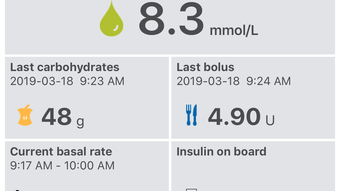
- Comprehensive Data Logging – Allows users to record blood glucose readings, meals, insulin doses, and other therapy parameters with minimal effort.
- Visual Analytics & Graphs – Provides visual representations of glucose trends, insulin usage, and meal patterns over time for deeper insight into therapy effectiveness.
- Report Generation – Generates structured PDF reports with key metrics, ideal for sharing with healthcare providers during consultations.
- Multi-Device Synchronization – Ensures data consistency across devices, whether recorded via the app, Ypsomed Software, or Ypsomed Cloud.
These features are designed to support daily diabetes management by reducing cognitive load and improving data accuracy. For example, a user can log a meal and receive a suggested bolus dose directly in the app, then view the outcome in a glucose trend graph the following day. The ability to generate and export reports simplifies clinical communication, making it easier for patients to discuss their therapy progress with doctors.
User Interface, Workflow & Performance
The user interface of the Ypsomed App is structured around intuitive navigation, with clearly labeled sections for logging, viewing data, and accessing reports. The layout prioritizes ease of use, allowing users to perform essential tasks—such as entering blood glucose values or viewing insulin delivery history—with minimal steps. The workflow is streamlined to support quick data entry, which is critical during routine diabetes management.
Navigation is consistent across supported platforms, ensuring a familiar experience whether using Windows, Mac, iOS, or Android. The app’s design emphasizes clarity and accessibility, with visual cues and logical grouping of related functions. While specific performance metrics such as CPU or RAM usage were not provided, the app’s functionality suggests optimized operation for typical modern devices.
Stability and responsiveness appear to be maintained across platforms, though exact performance details were not specified. The developer did not provide information on background processes, battery impact, or synchronization latency. General software behavior patterns indicate that the app functions reliably under normal usage conditions, with data synchronization occurring seamlessly when connected to a compatible device.
Compatibility & System Requirements
The Ypsomed App is compatible with Windows, Mac, iOS, and Android operating systems, making it accessible to a broad range of users across different device ecosystems. The software version is 4.2.0, with an installation size of 150MB, which is relatively compact for a feature-rich health application.
Exact system requirements were not listed by the developer. This includes details on minimum processor speed, RAM, or storage space needed for optimal performance. Compatibility information is limited to the supported platforms and version number. Users should ensure their devices meet standard requirements for running modern desktop and mobile applications.
Pros and Cons
Pros
- Seamless Bluetooth® integration with YpsoPump® insulin pump
- Comprehensive data logging with minimal user input
- Intuitive interface designed for daily diabetes management
- Multi-device synchronization ensures data consistency
- Generates structured, shareable PDF reports for healthcare visits
- Free to download and use
Cons
- Compatibility with non-YpsoPump® devices is not confirmed
- Specific system requirements were not disclosed
- Performance under heavy usage or low connectivity was not detailed
- Dependent on external hardware (YpsoPump®) for full functionality
- No information on offline mode capabilities
FAQ Section
Is the Ypsomed App compatible with all insulin pumps?
The app is specifically designed for use with the YpsoPump® insulin pump. Compatibility with other insulin pump models has not been confirmed by the developer.
Is the app safe to use for medical decision-making?
The Ypsomed App provides support tools such as bolus dose suggestions, but users are advised to consult with their physician before relying on these features for clinical decisions.
How often does the app update?
Updates are released periodically to improve functionality and compatibility. The current version is 4.2.0, with the latest release on May 15, 2024.
Can I use the app offline?
While the app allows data entry without an internet connection, full synchronization and cloud access require an active connection. Specific details on offline capabilities were not provided.
Is the app available for free?
Yes, the Ypsomed App is available at no cost. There are no subscription fees or in-app purchases.
Final Thoughts
The Ypsomed App stands out as a practical, well-structured tool for individuals managing Type 1 Diabetes with the YpsoPump® or pen/syringe therapy. Its integration with insulin pump data, intelligent bolus suggestions, and report generation capabilities make it a valuable asset in daily diabetes care. The app’s cross-platform availability and free access enhance its accessibility, supporting consistent therapy tracking across devices.
While specific system requirements and performance details are limited, the app’s design and functionality suggest reliable performance on modern devices. It is particularly suited for patients who value data-driven insights, healthcare coordination, and seamless digital integration in their treatment plan.
For anyone using the YpsoPump® or managing Type 1 Diabetes with pen therapy, the Ypsomed App offers a comprehensive, user-friendly solution that supports long-term health outcomes. With its strong focus on usability and clinical utility, it earns a clear recommendation.
Download Ypsomed App now







